
This article explains how to re-order cards from Vistaprint as well as our local Supplier (we use a local person for large orders only as the prices are better).
Cards include business cards, loyalty cards, complimentary coffee cards, as well as complimentary coffee cards for motels and other partner businesses.
We order 10,000 Loyalty Cards at once from:
Tim Colbourne – Time2print
TJC Advertising and Print
[email protected]
Mobile: 0490 885 558
Approximate price is $550 (be sure to get a quote before ordering to make sure the price hasn’t changed too much)
Before ordering your cards, please check what other cards are needed in the business to save on shipping
ALWAYS USE CASHREWARDS AND USE THE CODE ‘THANKS20’ FOR A 20% DISCOUNT (please note it will give an auto discount, BUT you must APPLY a new coupon code THANKS20 as this discount is much higher
1. Log into Vistaprint
Go to www.vistaprint.com.au and log in using the following details:
Username: [email protected]
Password: vistaprint4176
2. Select Cards To Re-Order
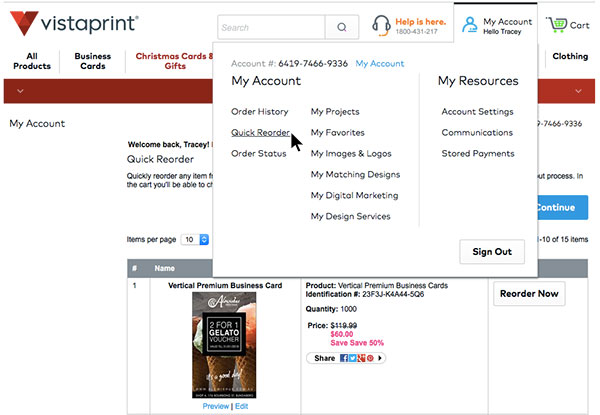
Hover over the ‘My Account’ tab and select ‘Quick Reorder’. Then select the cards you want to reorder and click on ‘Continue’ when you’re done.
3. Choose Printing Options
In the next steps you will be guided through selecting different printing options. Here’s what you need to select, if it’s not already selected.
Quantity:
Loyalty Cards – 5000
Complimentary Coffee Cards – 500
Personal Business Cards – 250
Motel & Partner Cards – 500
Brilliant Finishes
Select ‘No brilliant finish – INCLUDED‘
Paper Stock
Select ‘Premium Glossy‘
Then click on the shopping cart icon on the top right and continue to checkout. USE THE CODE ‘THANKS20’ or ‘care20’ FOR A 20% DISCOUNT – check if VIPINVITE works also
Congratulations! You have successfully re-ordered your cards.