
 Reconciling Payments “LOKEPayoutLOKEPayou_JY4kSxmG2097” (LOKE USES STRIPE)
- These are payments made to our Bank Account, that come from customer purchases on our Alowishus and Bert’s Apps
- They are reconciled as part of the Lightspeed Invoice that comes in Xero every night
- To get the breakdown for the payments, fees and App Credits Sold (only applys to Hospital Rec) open the appropriate report
- search [email protected] alowishus delicious — Reconciliation in your emails and all reports will show
- or Bert’s is [email protected] berts — Reconciliation
- open the report you wish to view and cross reference the ‘Total Payout’ amount to the credit in the bank
- record the actual date of your takings beside the corresponding credit in your bank (this is so you know which invoice to open)
- once you have the Xero Invoice open, right click on the appropriate payment and ‘open in a new tab’
- click ‘Remove & Redo’ to remove the payment
- Create a new payment for the ‘Total Fees’ amount and charge to the 6-1203 Merchant Fees – Loke App Xero Account (use same date as invoice) (reference app fees)
- If you then refresh the reconciliation feed in Xero, you will see the App Payment Amount becomes green and matches the bank account credit
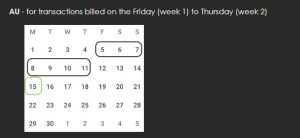
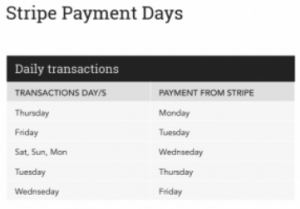
- NB: this won’t work for the Wednesday settlement as it’s made up of 3 days Saturday Sunday and Monday, you’ll need to use the ‘find and match’ option
- If you need to manually create the App Payment, then code it to the Tyro account with the reference ‘app payments‘
- NB – on most days the loke reconciliation report will show up 4 locations
- Alowishus Delicious Bundaberg (this line indicates all APP Credits purchased by customers, they are all credited to the Hospital Account, as such needs to split off and credit this amount to the Xero account 2-2450 Alowishus Bundaberg App Sales)
- Alowishus – Hospital
- Bundaberg
- Maryborough
- If you can’t locate the correct report, then log into https://office.au.loke.global/ (password will have been shared via lastpass)
- There is a separate log in for Alowishus and Bert’s
Video: Checking for refunds in Loke (when settlement doesn’t balance) (loom.com)