
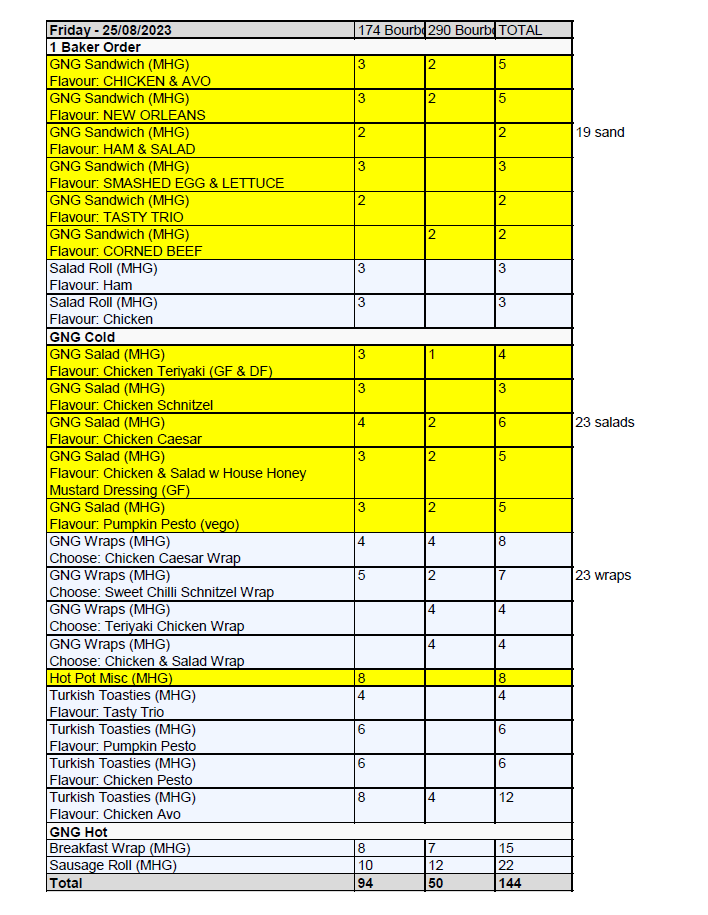
Example of a Production Grid Report
How to Create the Daily Production Grid Report
Do this report immediately after you have completed the bread order.
Wait until 4.30pm AEST Monday, Tuesday, Wednesday, Thursday and Sunday (Tracey does Sunday) to create this report
- Log into Flex
- Click Production Grid under ‘Favourites’
- Choose your Delivery Date (always the next day)
- Choose Bundaberg, under Locations
- Choose My Cafe Supplies under Product Categories
- Click Go to run the report
- Export the report to Excel
- Name the file according to the Day of the week the order is for eg Friday Report
- Once opened in Excel we are going to:
- remove columns A B & C (product code, kitchen notes, packing notes)
- remove rows 1 through to 6
- In 1A place the day and date eg Friday – 25/08/2023
- In 1D replace with the word ‘TOTAL’
- Place grid marks around the entire sheet and all cells
- Colour all the cells in every second product type, to make it more clear when one ends and the next starts
- Record total numbers for wraps, sandwiches and salads in column E
- Include Flex notes in the spreadsheet except for Cakes & Packaging
- Save as a PDF (please ensure report is only 1 page)
- Email to [email protected], subject line: Friday Order