
App Showing “ORDERING UNAVAILABLE’
This can occur when all of the Menu Categories at your location have been deselected in Lightspeed.
To check if this is the problem, follow these steps:
- Access ‘Back Office’ in Lightspeed
- Choose your location – Left Hand Menu, at the bottom (under Help and Support)
- Click on Products (left hand menu)
- Click on ‘Online Products’ – horizontal menu, last option
- Click Modify
- Check that your required categories have a ‘check mark’ in the “SHOW ONLINE” box to the right hand of the screen
- You will get an automatic ‘category saved’ message once you tick it.
- Go back to the app on your phone and check that ordering is available
Site is missing from app:
- log into Loke Global
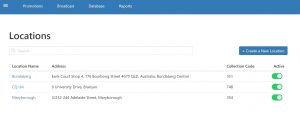
- Click on Hamburger Menu Symbol
- Click Locations
- Toggle from ‘inactive’ to ‘active’
- All done – see Screenshot attached
Full Menu is or isn’t showing when it should or shouldn’t be? Follow the link below to resolved this issue:
http://ask.alowishus.com.au/knowledgebase/turning-the-app-menu-on-off/
Bump Screen – Product Not Sending to Bump Screen
http://ask.alowishus.com.au/knowledgebase/bump-it-bump-screens/
Still not working? Log a support request by emailing [email protected]
Or ring our Account Manager Rebecca – 1300 349 469 or 0449 744 874